Recent Questions
Q: How do I make the top nav buttons exactly the same width for each button?
Total menu width is 743px and I have 6 buttons I want the width of each button to be fixed at 123px.
I set var menuWidth="743" but it averages out the buttons based on the text.
A: You should use individual item styles. For example:
var itemStyles = [
["itemWidth=123px"], //style 0
];
var menuItems = [
["Home","testlink.html", , , , , "0", , , ], //style 0
["Product Info","", "deluxe-menu.files/icon1.gif", "deluxe-menu.files/icon1o.gif", , , "0", , , ], //style 0
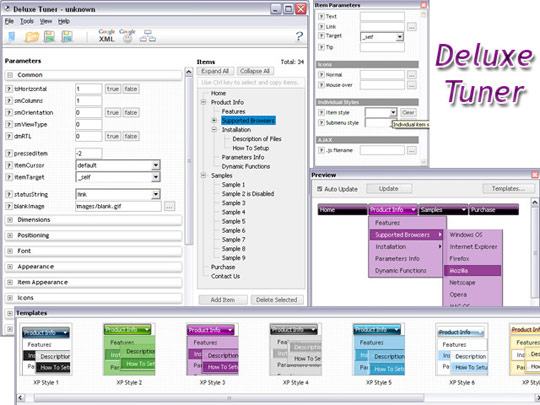
Q: Hi - I'm using Deluxe Tuner/Menu version 2.0 and wanted to know if it's possible to set the status bar messages to something other than the link text from the menu items that it currently picks up?
A: You should set parameter:
statusString="tip";
Text in a browser's status bar when you put a pointer over an item. Values:
"link" - show item link;
"text" - show item text;
"tip" - show item tip.
With another value shows specified value.
Info about this parameter you can find here
http://deluxe-menu.com/parameters-info.html
Q: I do not know how to prevent IE7 or IE8 displaying a security warning for the javascript dropdown menuI have created using your software. I get the warning message when I view the menu that I have created.
A: Try to set the following options in Internet Explorer:
1) Go to 'Tools -> Internet Options -> Security'
2) Select Local Intranet and then press 'Custom level...' button.
3) Run ActiveX Controls and plug-ins = Enable
Automated Prompting for ActiveX Controls = Disable
Q: I want to use your menu to create a javascript menu bars like effect in my application. For that I need only the images in the menu items and sub menu items(no text).
And I also want to enable disable toolbar items dynamically depending on the flow in my web application.
I could not find any help for the javascript API on your site that changes the menu dynamically.
A: Our menu is very flexible, so you'll be able to implement any menusystem you want, see for example:
http://deluxe-menu.com/data-templates/xp-style-taskbar-template-sample.html
http://deluxe-menu.com/data-templates/xp-style-1-template-sample.html
>> I could not find any help for the javascript API
Please see this:
http://deluxe-menu.com/functions-info.html
http://deluxe-menu.com/dynamic-functions-sample.html